Lumail vs Keap
Lumail
Keap
Small-business CRM and marketing automation
Lumail and Keap pricing and feature comparison
Free allowance
Lumail
$0
Keap
14-day trial
$0 · 3,000 emails · Unlimited subscribers
14-day trial
Paid entry
$20/month, 40,000 included, then $0.60/1,000
$299/month for 1,500 contacts and two users
Pricing basis
Unlimited subscribers; pricing follows email volume
Contacts plus user seats, a required setup package, and extra SMS and email fees
Automation
Graph workflows with triggers, branches, goals, exits, and A/B paths
Easy and advanced automation builders with ready-made templates
AI and developer access
ChatGPT OAuth, MCP, skills, CLI, SDK, REST API, and visual editor
In-app AI for drafting emails and campaigns, plus a REST API
Transactional email
Included through API, SMTP, SDK, CLI, and agent tools
No transactional email service or SMTP relay
Publishing surface
Capture pages and custom web domains; not a general website builder
Landing pages, sales funnels, forms, and checkout forms
Choose Lumail if…
- You want to pay by emails sent from $20/month, not $299 for 1,500 contacts
- You need transactional email via API or SMTP next to campaigns
- You want 89 MCP tools, CLI, and SDK instead of a CRM API
Choose Keap if…
- You need CRM, sales pipeline, appointments, and payments with your email
- You want SMS and a business phone line alongside email
- You want Keap to set everything up for you
Where Keap is strong
A real alternative, not a straw man.
Keap, formerly Infusionsoft, is a small-business CRM with email, SMS, pipelines, payments, and landing pages, from $299/month for two users and 1,500 contacts. People pick Keap when they need service businesses that want CRM, follow-ups, SMS, and payments in one account.
- CRM, pipeline, appointments, invoices, checkout, email, and SMS in one place
- Automation templates plus AI help for copy and campaigns
- Guided setup with a dedicated customer success manager
Don't trust the table. Run one journey.
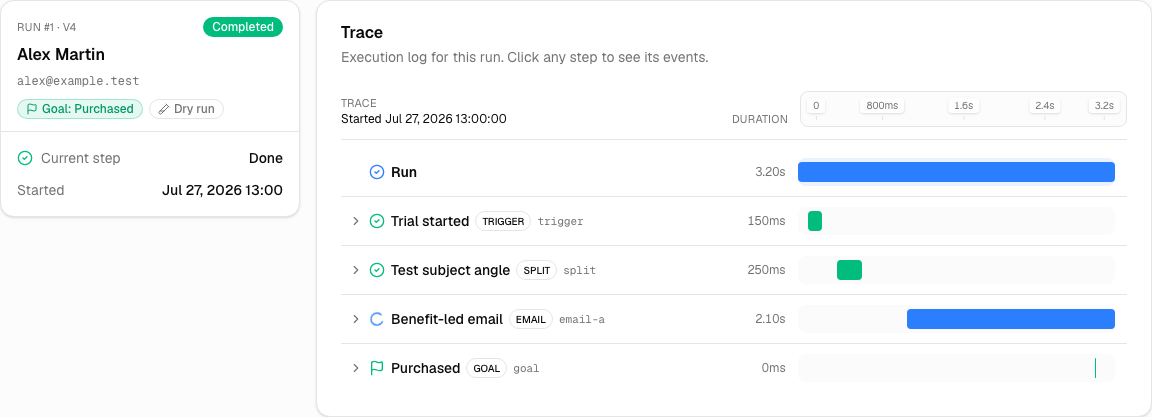
Checklists lie by flattening the work. Build one real path: a trigger, a wait, a branch, a goal, an exit. Then open one subscriber and see what actually happened. That tells you more than any feature row.
- 1. Import a small, consented sample. Not the whole list.
- 2. Recreate one campaign and the audience it actually hits.
- 3. Publish one automation with a goal you can measure.
- 4. Fire a test and read every event on one person.
- 5. Compare the weekly work, not the setup afternoon.
Try it on a real send
Keep the whole list. Pay when you send.
3,000 emails free, no card. Rebuild one campaign, one workflow, and one transactional message before you move anyone. If it feels worse than Keap, stay.
The questions people actually ask
Is Lumail cheaper than Keap?
Sometimes. Lumail is $0 for 3,000 emails, then $20 for 40,000. Keap's number only makes sense after you know what they cap: contacts, seats, a daily send limit, or a feature they hide behind a paid plan. Read the honest take above, then price a normal month and a launch month on both pages.
What is the main difference between Lumail and Keap?
Choose Keap for CRM, email, SMS, invoices, and landing pages in one small-business platform with done-for-you setup. Choose Lumail for unlimited subscribers billed by emails sent, graph workflows, transactional email, and 89 MCP tools without a CRM.
Can I migrate from Keap to Lumail?
Yes. Don't move the whole list on day one. Export a small consented sample, rebuild one campaign and one automation, authenticate your domain, then watch one subscriber go through the run. If that feels right, move the rest.